Entradas

Mostrando las entradas etiquetadas como Windows Varios

Continuous Grow file Setupapi.log, WINLOGON High CPU usage and takes a long time to log on to a Windows.

Use filemonitor or ProcessExplorer to diagnostic. C:\WINDOWS\setupapi.log contains information about application installation, it log file is used to trace the cause of problems should they arise after an installation of a device or drivers. Incident: In my case file C:\WINDOWS\setupapi.log is big and WINLOGON. EXE consume high CPU went users login in the server. Workaround: Open your registry editor. Go to “HKEY_LOCAL_MACHINE\Software\Microsoft\Windows\Curr entVersion\Setup\LogLevel” registry key. Set LogLevel key to 0 Restart server. More Info: http://msdn.microsoft.com/en-us/library/ff550845(v=vs.85).aspx http://support.microsoft.com/kb/958909/es

How do Check the MSI Version on your Computer

Imagen
To detect the MSI or Microsoft Installer version check the version of MSI.DLL in the %SystemRoot%\System32 folder, Example: Or Execute: msiexec.exe /?

Testing the ASP.NET Installation, and Show Version

If there's a version of the .NET Framework present (check if the .NET Framework is installed) then we can move on to the next step of testing the script below to make sure that everything is functioning correctly. IIS on installation creates a folder called ‘Inetpub’ on your hard drive, under Inetpub there is another folder called ‘wwwroot’. The wwwroot folder is the root folder for your website. By default the folders are placed on your C drive, C:\Inetpub\wwwroot. You can copy the code below into a new file called 'test.aspx' and place in the wwwroot folder. <%@ Page Language="VB" %> <script runat="server">     Protected Sub Page_Load(ByVal sender As Object, ByVal e As System.EventArgs)         lblVersion.Text = "Your server is running ASP.NET and the version is " & System.Environment.Version.ToString()     End Sub </script> <html...

Register .NET Framework in IIS

If you install the .NET Framework on a system that has IIS already installed, IIS is automatically configured to handle requests to ASP.NET pages, and to redirect the execution to the ASP.NET runtime. However, it may happen that you installed the framework on a Windows system where IIS was not already present, and just later decided to add IIS. Registering ASP.NET on IIS is not just a matter of associating the various .aspx, .asmx, .axd, .ashx and the other ASP.NET extensions to the aspnet_isapi.dll ISAPI, more has to be done to create the ASP.NET account and to set it for ASP.NET requests, register the ISAPI itself and other stuff. Doing all this manually can be a difficult operation, and requires a good understanding of many details. Fortunately there is an utility, shipped with the .NET Framework but not documented, that can take care of these configuration chores for you. The utility is aspnet_regiis.exe, it is located under %WindowsDir%\Microsoft.NET\Framework\vx.y.zzzz\ and you s...

DNS client settings in Windows 2000 Server and in Windows Server 2003

  Hace algunos días, me preguntaban como configurar los DNS primario y secundario de los controladores de dominio, pues bien aquí dejo las opciones que tenemos al realizar esta configuración: Configure the Preferred DNS server in TCP/IP properties on each Domain Controller to use itself as Primary DNS Server. Advantages: Ensures that DNS queries originating from the Domain Controller will be resolved locally if possible. Will minimize impact of Domain Controller’s DNS queries on the network Disadvantages: Dependant on Active Directory replication to ensure that DNS zone is up to date. Lengthy replication failures may result in an incomplete set of entries in the zone. Configure all Domain Controllers to use a centralized DNS server as their Preferred DNS Server. Advantages: Minimizes the reliance on Active Directory replication for DNS zone updates of Domain Controller locator records. This includes faster discovery of new...

Servicios en la Nube Windows Azure

Imagen
Windows® Azure is a cloud services operating system that serves as the development, service hosting and service management environment for the Windows Azure platform. Windows Azure provides developers with on-demand compute and storage to host, scale, and manage web applications on the internet through Microsoft® datacenters. See: http://www.microsoft.com/windowsazure/windowsazure/

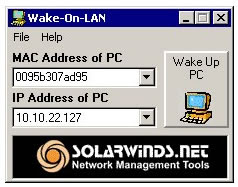
Se Apago el Servidor o Apagaron tu Estacion de Trabajo!!

Imagen
Si no puedes ir fisicamente a encender el equipo y puedes acceder remotamente a otro PC dentro de la misma subred.... Facil!! Utiliza Wake-On-LAN es una herramienta gratuita de SOLARWINDS, necesitaras la direcion MAC y la direccion IP. Nota: Debes tener la opcion de Wake on LAN en la BIOS Habilitada http://www.solarwinds.com/products/freetools/wake_on_lan.aspx

Reinstalación WMI

  Detener ele servicio net stop winmgmt Renombrar la carpeta: %windir%\System32\Wbem\Repository. (por ejemplo, %windir%\System32\Wbem\Repository_bad). Ejecutar en la línea de comandos: net start winmgmt Windows Server 2003 rundll32 wbemupgd, RepairWMISetup Windows XP rundll32 wbemupgd, UpgradeRepository Windows VISTA winmgmt /salvagerepository